Pros
- Strong suction and a 3-stage brush system for everyday debris and pet hair.
- Self-emptying base reduces how often you have to think about the dust bin.
- Smart mapping and app control make room targeting and scheduling practical.
The Roomba j9 is aimed at households that want a robot vacuum to handle daily floor cleanup with less babysitting, especially homes with pets and mixed hard floor and carpet surfaces. Its appeal is the combination of stronger suction, smart mapping, obstacle avoidance, and a self-emptying base that cuts down on how often you have to think about the machine. The trade-off is that this is still a pricey robot vacuum with mixed reliability, so the value depends on whether you care more about automation than absolute consistency.
Buy it if you want a pet-focused robot with a self-emptying dock and you are comfortable living inside the app for setup, room control, and cleaning schedules. Skip it if you want the safest choice for spotless reliability or if you are sensitive to a robot that can be loud, fussy, or inconsistent over time. The j9 makes the most sense for buyers who want convenience first and can accept some uneven behavior as the price of that convenience.
| Suction | 100% stronger suction compared with Roomba Combo i Series robots |
|---|---|
| Navigation | PrecisionVision Navigation with a camera |
| Dock | Self-emptying base with up to 60 days of debris capacity |
| Battery Life | Up to 180 minutes |
| Cleaning System | 3-stage cleaning system with Dual Multi-Surface Rubber Brushes and an Edge-Sweeping Brush |
| Voice Assistant | Works with Alexa, Siri, and Google Assistant-enabled devices |
The dock holds up to 60 days of debris, which is the feature that most directly changes daily ownership. It cuts down on emptying frequency and makes the robot feel more autonomous, especially in homes that generate a steady stream of pet hair and dust.
That convenience has a cost in complexity and consumables. The base adds another moving part to the system, and the bagged design means the automation is not completely maintenance-free, even if it is much lighter than emptying the robot bin after every run.
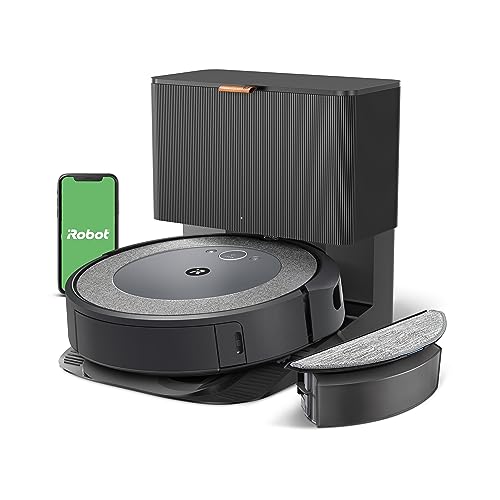
PrecisionVision Navigation with a camera gives the j9 a real reason to exist in busy homes. It is designed to recognize and avoid objects like cords, socks, shoes, and pet waste, which is exactly the kind of daily clutter that decides whether a robot gets used or abandoned.
This is the feature that can save the most time, but it is also the one that matters most when it works imperfectly. If your floors are usually clear, you will get less benefit from it; if your floors are often busy, it becomes the difference between a useful helper and a robot that constantly needs rescue.
The 3-stage cleaning system, dual rubber brushes, and stronger suction are all aimed at the same buyer problem, which is keeping up with hair and debris without constant manual passes. That lines up well with the product’s pet-focused positioning and the frequent use case of hard floors plus carpet.
The practical upside is less visible drama and more steady upkeep. The limitation is that the machine still lives within robot-vacuum boundaries, so tight corners, deep edge cleanup, and truly heavy messes still belong to a full-size vacuum.
In a pet-heavy living room, the j9’s main draw is how much routine labor it removes. The self-emptying base means the bin does not become a daily chore, and the 180-minute battery figure gives it enough runway for larger cleaning loops before it has to head back. That combination makes it a practical fit for homes that want floors kept in shape between deeper cleanings, not a machine you have to hover over every time it runs.
Around furniture legs, cords, shoes, and bowls, the attraction is the obstacle-avoidance setup. The camera-based navigation and PrecisionVision system are built for the kind of clutter that trips up simpler robots, and that matters more than raw suction for many homes. The catch is that the same kind of smart navigation that makes it appealing can also make the experience feel variable, with some owners getting smooth room-by-room coverage and others running into resets, missed areas, or awkward detours. That makes it better for buyers who value automation and mapping enough to tolerate occasional friction.
For mixed floors, the j9 is strongest when carpet pickup and hard-floor cleanup both matter, but it is not the kind of robot that erases all manual vacuuming. The 3-stage system and stronger suction help it stay credible on pet hair, crumbs, and everyday dirt, yet the overall rating and recurring reliability complaints keep it out of the “set it and forget it forever” tier. If your home is open, cluttered, or highly dependent on perfect repeatability, the convenience story weakens fast.
Community
The pattern here is simple enough to read as a buyer rule. When the j9 works, people like the mapping, the app control, the pet-hair cleanup, and the self-emptying convenience; when it disappoints, the complaints center on reliability, docking, navigation, and how much effort it still asks from the owner. The practical lesson is that this is a convenience-first robot, not a low-risk bargain pick.
The setup was super easy as long as I was comfortable using my phone’s app, and the initial mapping was very cool to watch.
Simply put, this does not work for me, and I ended up paying to ship it back.
This will clean my floors 90% of the time, every time, and the app gives me lots of information.
It mapped my home really well, but it ran right over a mess it was supposed to avoid and the camera was hard to use in lower light.
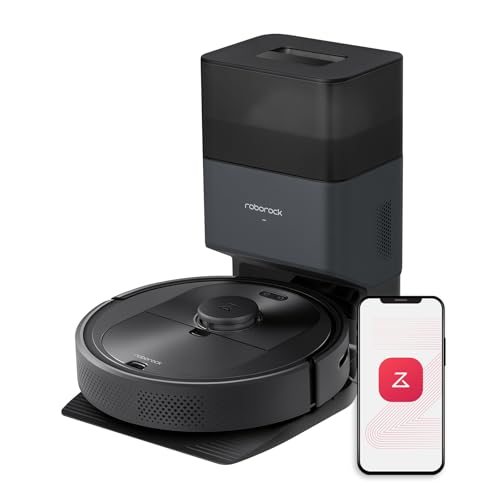
Against the Roborock Q5 Pro+, the Roomba j9 is the more specialized choice if obstacle avoidance and pet-focused cleanup matter more than a simpler LiDAR-first approach. The Roborock route is easier to frame as a straightforward mapping-and-emptying robot with a LiDAR dock setup, while the j9 leans harder into reacting to clutter in real time. If you want the cleaner, more predictable mapping style, Roborock has the easier pitch; if you want the robot that is built around pets and floor clutter, the j9 is the more targeted buy.
Against the Dreame L40 Ultra, the j9 is the simpler machine because it is vacuum-only and stops at self-emptying, while the Dreame route goes much further with mopping, self-refilling, hot-water washing, drying, and mop lift. That makes Dreame the better fit for buyers who want one robot to cover vacuuming and mopping in a more complete station setup. The j9 makes more sense if mopping is not part of the job and you want to keep the system narrower, but the Dreame class is the more ambitious all-in-one route.
The Roomba j9 makes the strongest case when you want a pet-friendly robot vacuum with smart mapping, obstacle avoidance, and a self-emptying dock that reduces daily chores. If that combination matches your house, it is easy to see why the j9 stays relevant even with a middling rating, because the convenience package is real and the feature set is well aligned to busy homes. If the current offer is close to other premium robot vacuums, the j9 is worth considering for its pet-first focus and automation. The skip case is just as clear. If you want the most dependable robot possible, or you do not want to live with reports of resets, docking quirks, and occasional avoidance misses, this is not the cleanest buy. I would steer those buyers toward a more predictable alternative route, while the j9 remains the better fit for shoppers who value smart cleanup and can accept some rough edges.
Still, compare iRobot Roomba j9 with close alternatives if warranty, noise, real battery life, or included accessories are decisive for you.
Does the self-emptying base remove all maintenance? No, it cuts down on emptying but still adds bagged consumables and dock upkeep.
With iRobot Roomba j9+ Self-Emptying Robot Vacuum – Powerful Suction, Identifies and Avoids Obstacles Like Waste, Self-Empties for 60 Days, Best for Homes with Pets, Smart Mapping, Works with Alexa, it looks best suited to office work, web use, streaming, and other everyday tasks based on the listed specs. If you need heavier workloads, compare performance, cooling, and software requirements more closely.